Resource levelling in Primavera P6 is a structured approach to adjusting project schedules so that resources are used efficiently without overloading teams or equipment. In real-world projects, limited availability of people, machinery, or budgets can quickly disrupt timelines and inflate costs if not managed properly.
Resource levelling helps project managers address these challenges by aligning
activities with available resources, resulting in smoother workflows and more reliable delivery. In this blog, we’ll break down the step-by-step guide on how leveling works in Primavera P6.
Step-by-Step Guide to Resource Leveling
The following framework explains how to systematically apply resource leveling to achieve balanced workloads and better control over project timelines:
Step 1: Review Resource Allocation
Start by examining how resources are currently assigned across the project. This helps you identify any workload imbalances before applying resource leveling.
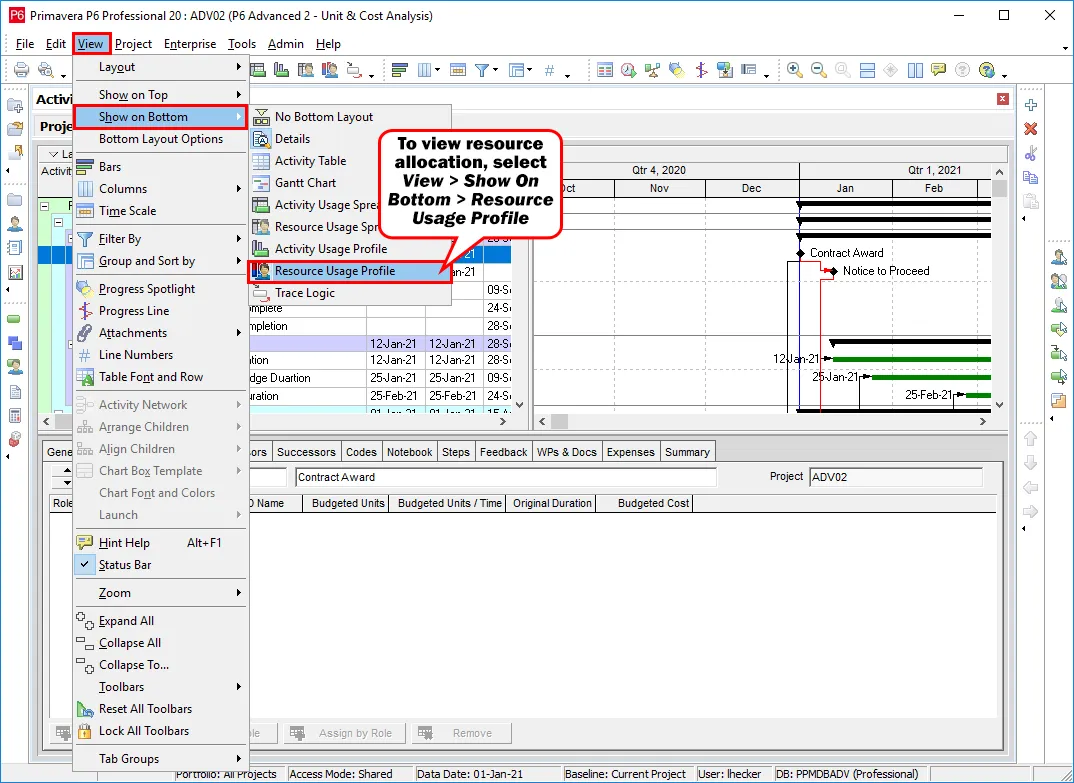
Go to View > Show on Bottom > Resource Usage Profile to open the Resource Usage Profile.
Source: Taradigm (https://www.taradigm.com)
Step 2: Analyze the Resource Usage Profile
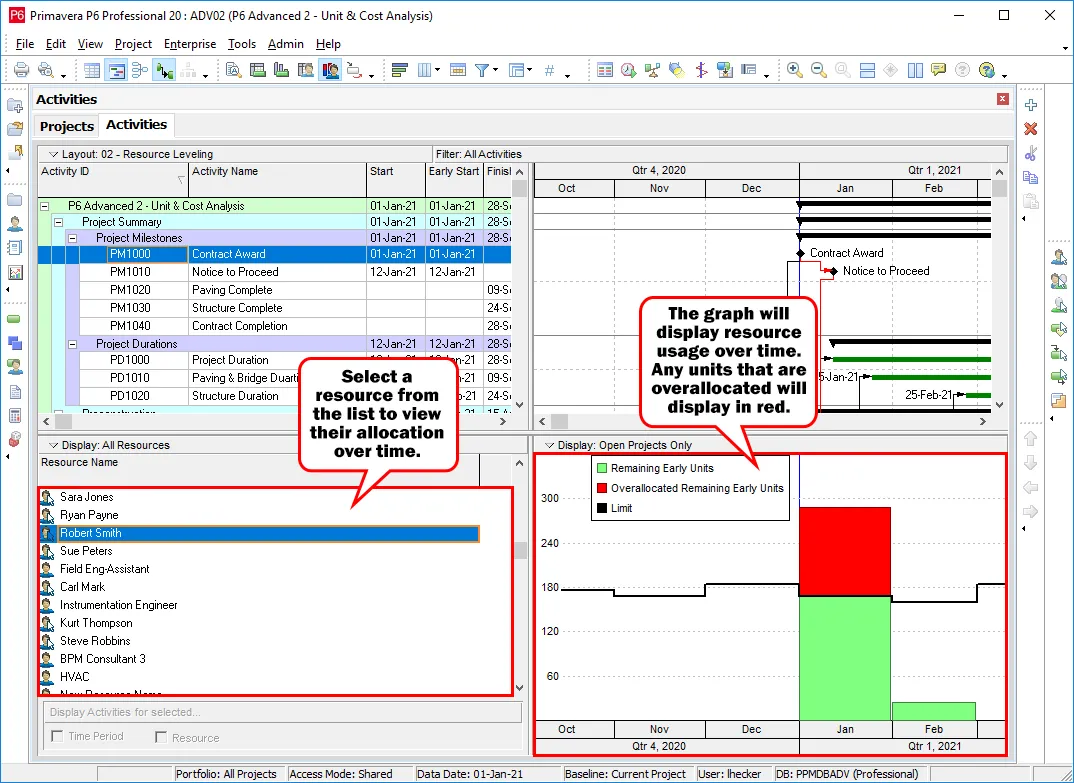
In the left panel, select the resource you want to evaluate. The graph on the right displays how that resource is utilized over time.
Key indicators include:
- Budgeted Units – planned workload
- Actual Units – work already completed
- Overallocated Units – work exceeding capacity
A black limit line represents the maximum units the resource can handle per time period. If the bars extend beyond this line and appear in red, the resource is overallocated and needs adjustment. To help project managers handle such scenarios effectively and prevent costly downtime, we offer our Plant Shutdown Management Course, which teaches practical strategies for managing resource conflicts during critical shutdowns.
Step 3: Identify Overallocation Issues
Review the timeline carefully to pinpoint periods where resource capacity is exceeded. Any overallocation should be resolved before the project begins to avoid delays, burnout, or missed deadlines. This concept is a core focus in our Delay Analysis & Claims Management Course, where managing resource conflicts is essential for timely project delivery.
Step 4: Decide the Leveling Priority Scope
Determine whether to set leveling priorities at the project level or activity level:
- Use project-level priorities when leveling multiple projects together.
- Use activity-level priorities when resolving conflicts within a single project.
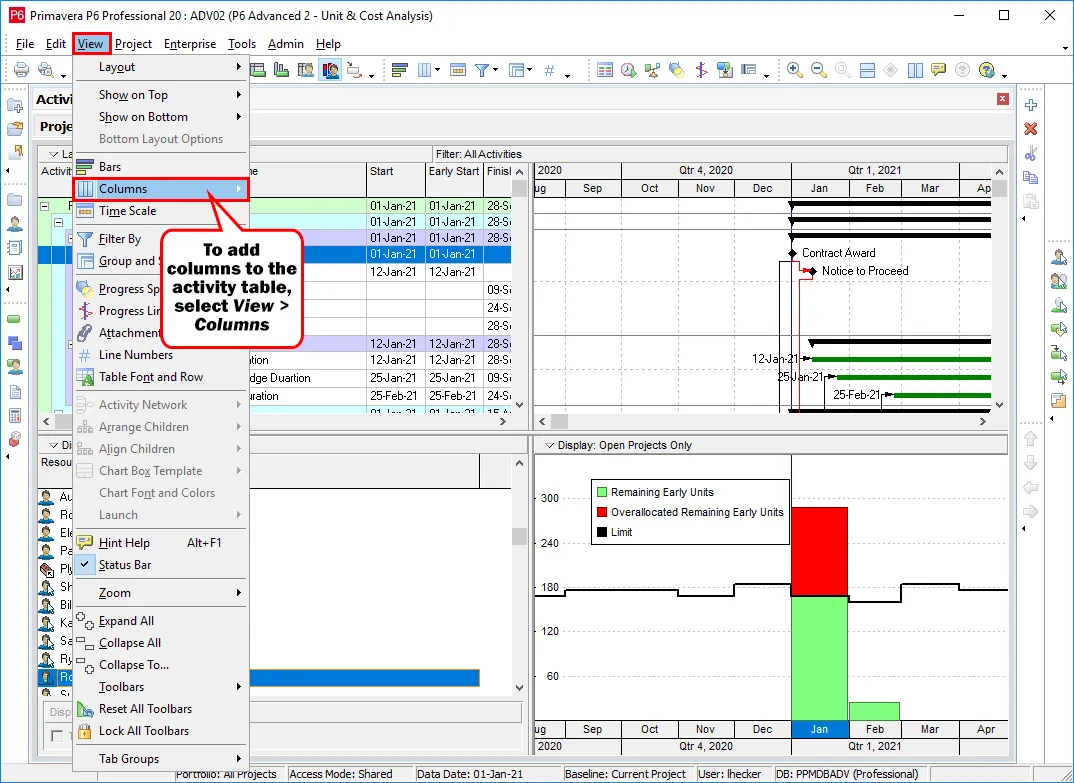
Step 5: Enable the Activity Leveling Priority Column
To assign priorities to activities:
- Navigate to View > Columns
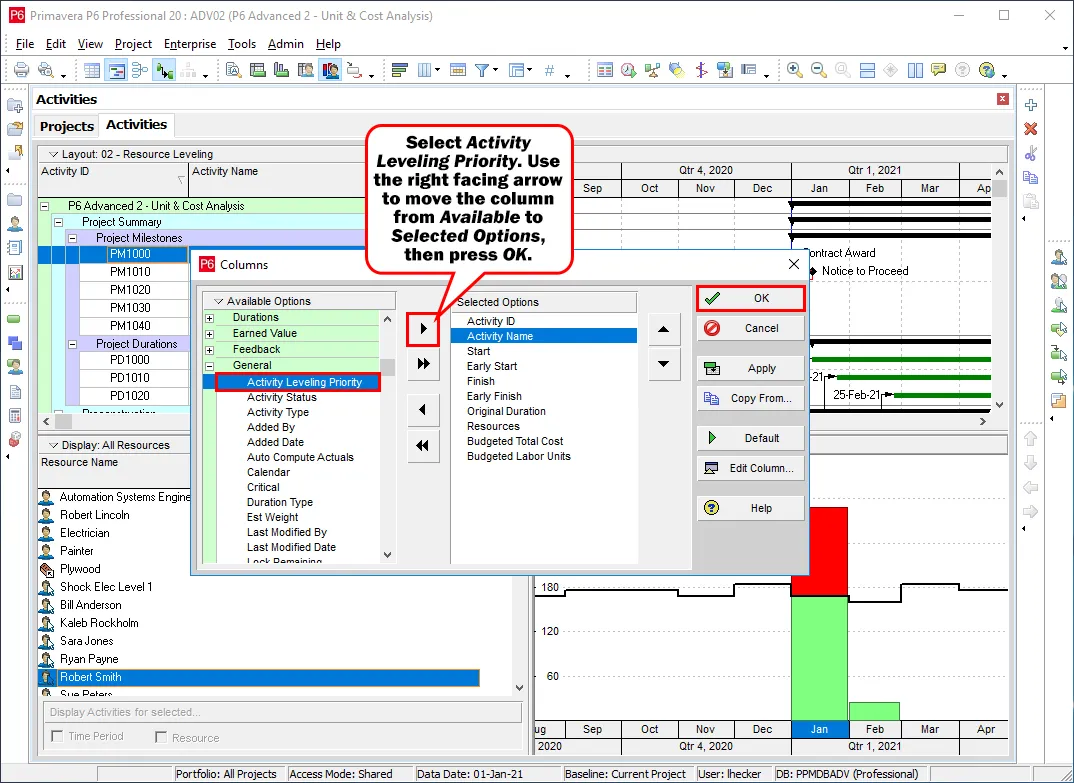
- Locate Activity Leveling Priority under the General category
- Move it from Available to Selected
- Click OK to apply the changes
Step 6: Assign Activity Priorities
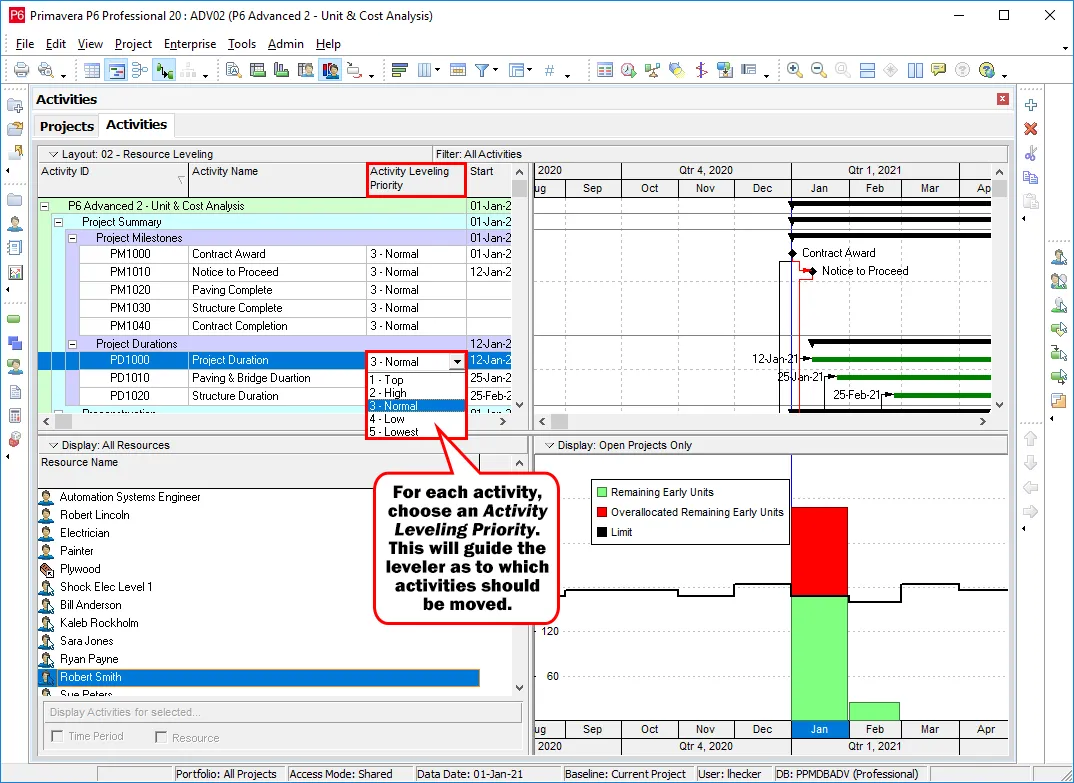
Use the Activity Leveling Priority column to rank activities from Top to Lowest priority.
- Activities marked as Top are preserved during leveling
- Lower-priority activities are adjusted first
Step 7: Apply Resource Leveling
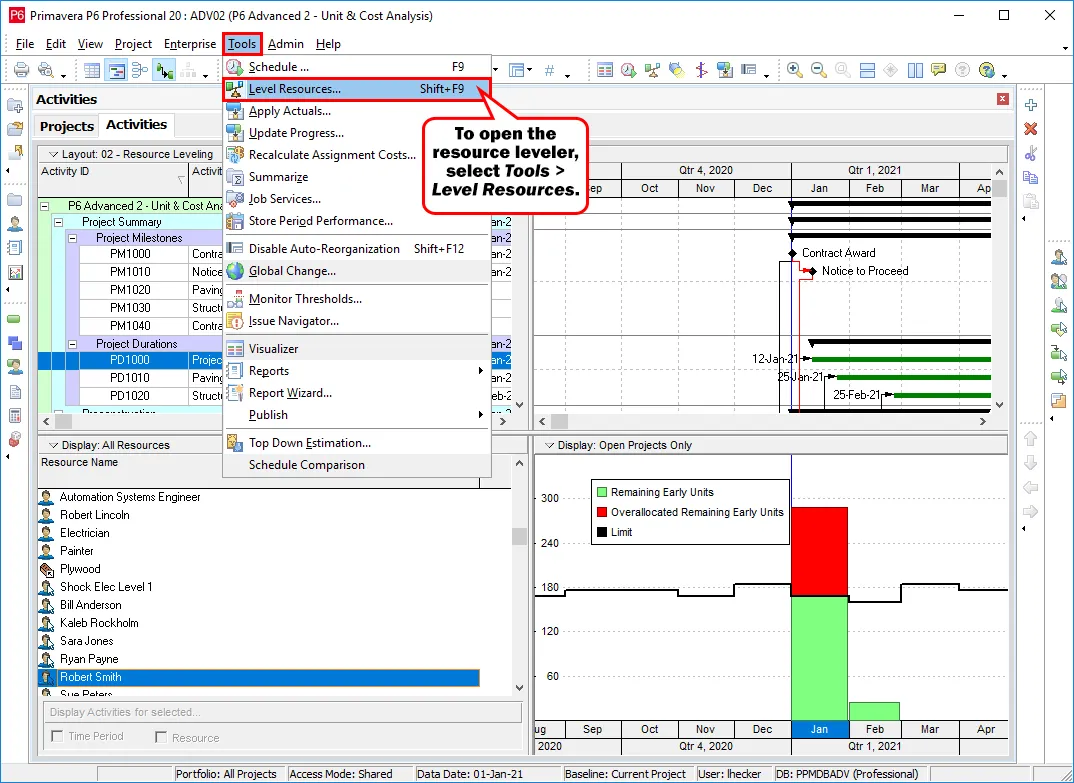
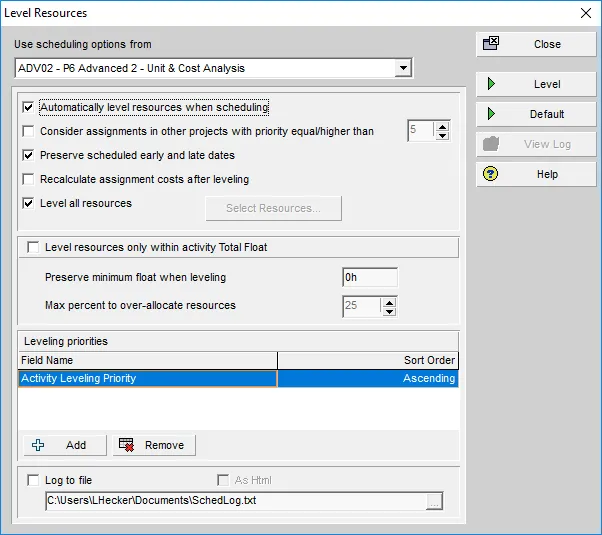
Once priorities are set, initiate resource leveling by selecting Tools > Level.
This opens the Level Resources dialog box, where you can review and adjust leveling options before proceeding.
Step 8: Review Leveled Schedule
After leveling is complete, recheck the Resource Usage Profile to confirm that overallocation has been resolved and workloads are now balanced without impacting critical deadlines.
Want to Manage Your Project Like a Pro!
Here’s our detailed guide on old vs modern project management
Conclusion
Resource levelling in Primavera P6 is an essential technique for ensuring that project resources are used efficiently without overloading teams or equipment.
In this guide, we covered how to review resource allocation, analyze usage profiles, assign activity priorities, and apply leveling in Primavera P6 to achieve a smoother, more reliable project schedule.
By leveraging Primavera P6’s resource levelling features, project managers can optimize resource allocation, prevent bottlenecks, and ensure projects are completed on time.