
In complex project environments, the ability to share, analyze, and integrate scheduling data efficiently is essential. This is where the export capabilities of Primavera P6 become incredibly valuable. Whether you are collaborating with external contractors, generating reports for stakeholders, or integrating schedules with other systems, exporting project data in the right format ensures accuracy and smooth communication.
In this guide, we’ll explore the export formats in Primavera P6, explaining how each works and its key characteristics.
Why Exporting Data From Primavera P6 Matters?
Exporting project data is crucial in modern project environments. Organizations often need to:
- Share schedules with contractors or clients
- Integrate data with other project management tools
- Create reports for stakeholders
- Maintain project backups
- Comply with government or industry regulations
Moreover, with our Primavera P6 services, we make it easy for organizations to collaborate, maintain compliance, and keep projects running smoothly.
Major Export Formats in Primavera P6
To better understand how Primavera P6 handles data sharing and integration, it’s important to explore the different export formats it supports. Below, we’ve explained the major export formats in Primavera P6 and how they are typically used in real project environments:
1. XER File Format (Primavera PM Export)
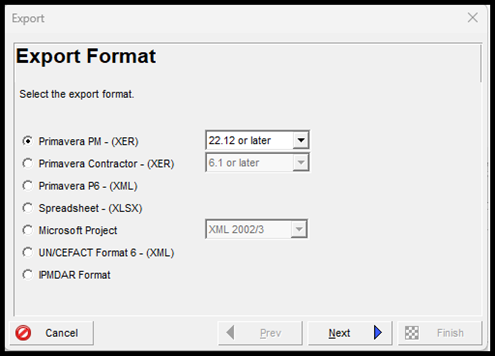
The XER format is the native export file type used by Primavera P6 and is specifically designed for transferring project data between Primavera environments. It is a text-based file with a structured format that can even be opened using simple text editors such as Notepad.
Despite its simple structure, the file contains extensive project information, including activities, work breakdown structures (WBS), calendars, resources, costs, and user-defined fields.
Best Use Cases
- Sharing projects between Primavera P6 databases
- Creating project backups
- Performing advanced external data analysis
Source: Planning Enginner FZE.
2. XER Contractor Export Format
The Contractor XER format is a restricted variant of the standard XER file designed for controlled data sharing. It follows the same file structure as the regular XER format but excludes sensitive global data, such as roles, system calendars, and other internal configuration settings.
This allows organizations to share essential schedule information while protecting confidential project settings and company-specific data. As a result, it provides a balanced approach that maintains the integrity of the project schedule while limiting access to sensitive system-level information.
Best Use Cases
- Sharing schedules with external contractors
- Protecting confidential project settings
- Meeting contractual confidentiality requirements

3. Primavera XML Export Format
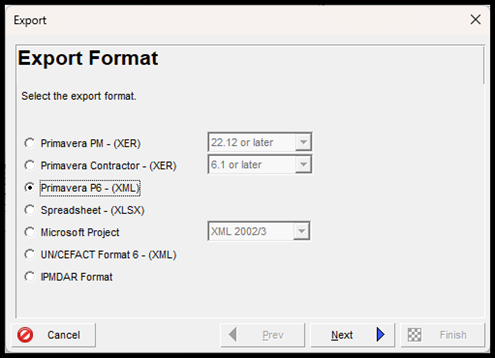
The XML export format provides a structured and flexible way to transfer project data from Primavera P6. Unlike the XER format, XML uses a standardized markup language structure that allows easier integration with external systems and applications.
The Primavera XML format can also include additional elements such as baseline schedules and layout configurations, making it useful for transferring complete project environments.
Best Use Cases
- Transferring complete projects with baseline schedules
- System integration with external tools
- Long-term data exchange between organizations
4. Spreadsheet Export (Excel XLS/XLSX)
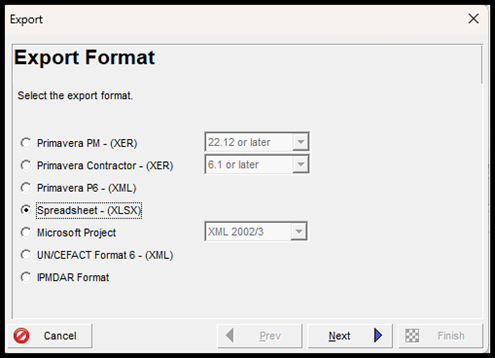
Primavera P6 also allows users to export project data into spreadsheet formats compatible with Microsoft Excel. This export option converts project information into an easy-to-read and editable format that many professionals are familiar with.
Data such as activities, relationships, resources, and costs can be exported and analyzed within Excel, making it useful for reporting and data review. However, if the data needs to be imported back into Primavera, the spreadsheet must follow strict formatting rules.
Best Use Cases
- Creating reports and dashboards
- Bulk updates to activity data
- Sharing project information with non-Primavera users
5. Microsoft Project XML Export
Primavera P6 supports exporting schedules in a format compatible with Microsoft Project, allowing teams using different scheduling tools to collaborate more easily. This export typically includes key project elements such as activities, durations, and work breakdown structures.
While it helps bridge the gap between the two platforms, differences in scheduling engines may cause certain data elements, such as dates or durations, to be recalculated when the file is opened in Microsoft Project.
Best Use Cases
- Cross-platform project collaboration
- Joint ventures where teams use different scheduling software
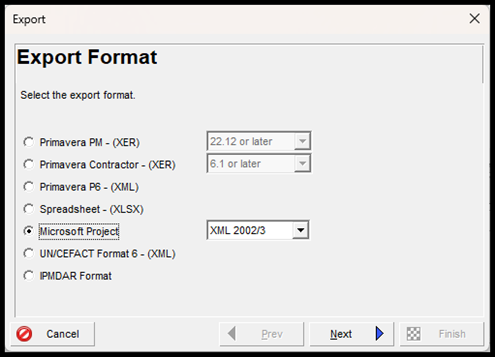
6. UN/CEFACT XML Export Format
The UN/CEFACT XML export format is designed for organizations that must follow international data exchange standards. It is based on guidelines from the United Nations Centre for Trade Facilitation and Electronic Business (UN/CEFACT), which promote standardized electronic data sharing across industries. This format is software-independent and is often used for Integrated Master Schedule (IMS) reporting in highly regulated industries.
Best Use Cases
- Government and defense projects
- Compliance-driven industries
- Standardized project reporting requirements

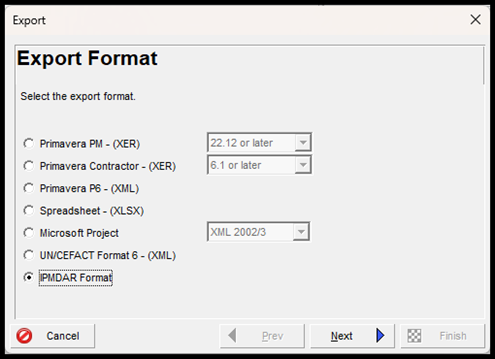
7. IPMDAR Export Format
The Integrated Program Management Data and Analysis Report (IPMDAR) export format is a specialized reporting format primarily used for government and defense programs. Instead of exporting a single file, Primavera P6 generates a compressed ZIP package containing multiple data files such as JSON, XML, and CSV. These files collectively include schedule data, cost information, and earned value management (EVM) metrics.
Best Use Cases
- Reporting for U.S. Department of Defense projects
- Earned Value Management (EVM) compliance
- Federal project performance tracking
Want to Convert Your Progress from P6 to Excel!
Here’s our detailed guide on how to prepare Excel-based progress measuring system:
Conclusion
Primavera P6 supports several export file formats designed for data sharing, reporting, compliance, and integration. From the widely used XER format to specialized formats like UN/CEFACT XML and IPMDAR, each serves a unique role in project management workflows.
In this guide, we explored the key export file formats supported by Primavera P6. We also discussed their key characteristics and best use cases, highlighting how each format serves a specific purpose.
By understanding these export formats in Primavera P6 and their appropriate use cases, project managers can improve collaboration, protect sensitive data, and meet industry compliance standards.