Primavera P6 is a powerful project management tool, but its real value depends on how well your schedule is structured. Activity steps help break complex activities into clear, manageable actions, making progress easier to track and control. By using activity steps effectively, you improve visibility, strengthen accountability, and maintain better control over timelines. In this guide, we’ll explore the key advantages of activity steps in Primavera P6 and how they help you manage projects more efficiently.
Want to Learn More About Primavera P6!
Here’s our detailed guide on FREE Primavera P6 Training for Road Construction Project.
How to Use Activity Steps?
Before understanding the advantages of activity steps, it’s important to understand how activity steps break a single activity into measurable components:
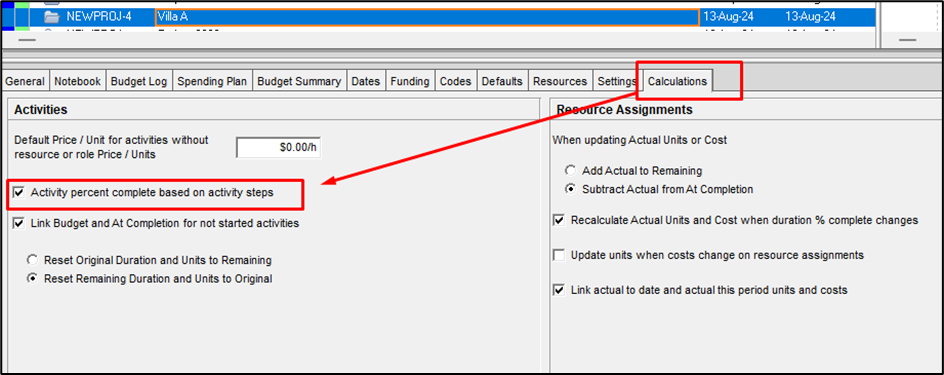
- Start by updating the project calculations so progress is measured using activity steps.
Source: https://planningengineer.net/comprehensive-guide-to-using-activity-steps-in-primavera-p6/
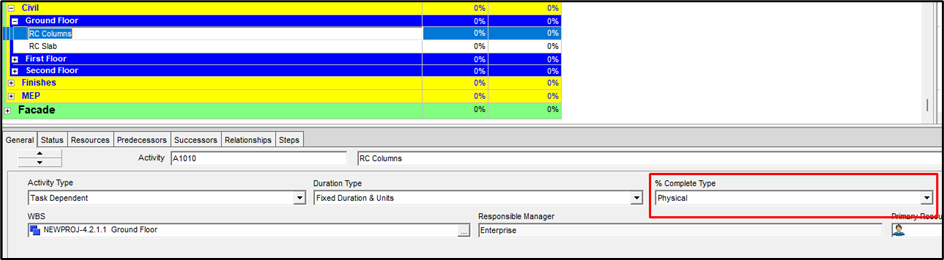
- Change the % Complete Type of the activities that include steps to Physical.
Source: https://planningengineer.net/comprehensive-guide-to-using-activity-steps-in-primavera-p6/
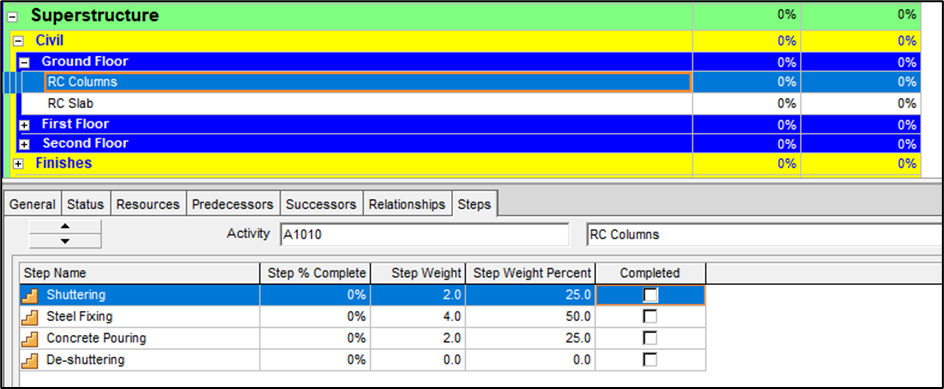
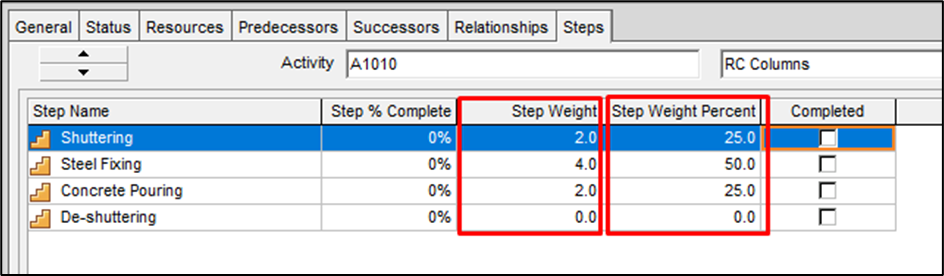
- In this example, we’ll use RC Column as the activity. Add steps such as shuttering, steel fixing, concrete pouring, and de-shuttering, then assign a weight to each step.
Source: https://planningengineer.net/comprehensive-guide-to-using-activity-steps-in-primavera-p6/
- Step Weight represents your estimated contribution of each step to the overall activity. Here, we assumed a total weight of 8. Shuttering was assigned 2 out of 8. Once weights are entered, Primavera P6 automatically calculates the Step Weight Percent.
Source: https://planningengineer.net/comprehensive-guide-to-using-activity-steps-in-primavera-p6/
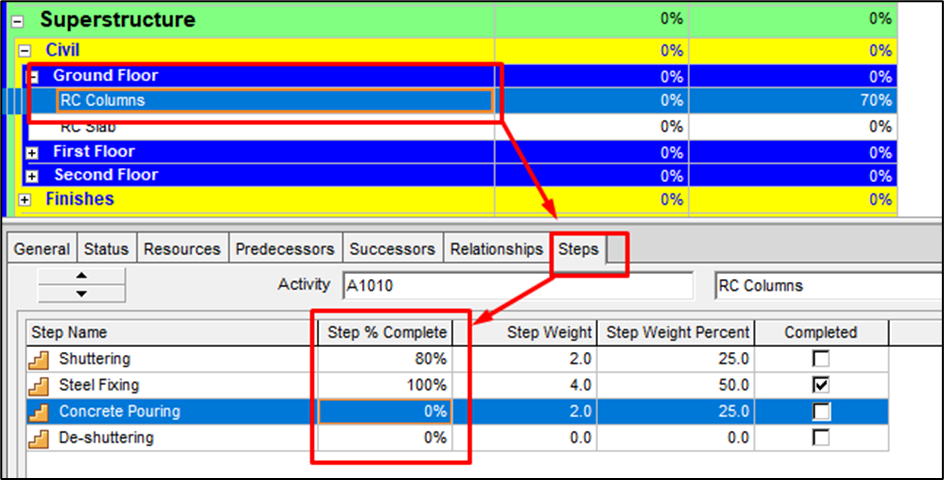
- You can now update the schedule. For example, if steel fixing is complete and shuttering is 80% complete, open the activity, go to the Steps tab, and enter these values in the Step % Complete field.
Source: https://planningengineer.net/comprehensive-guide-to-using-activity-steps-in-primavera-p6/
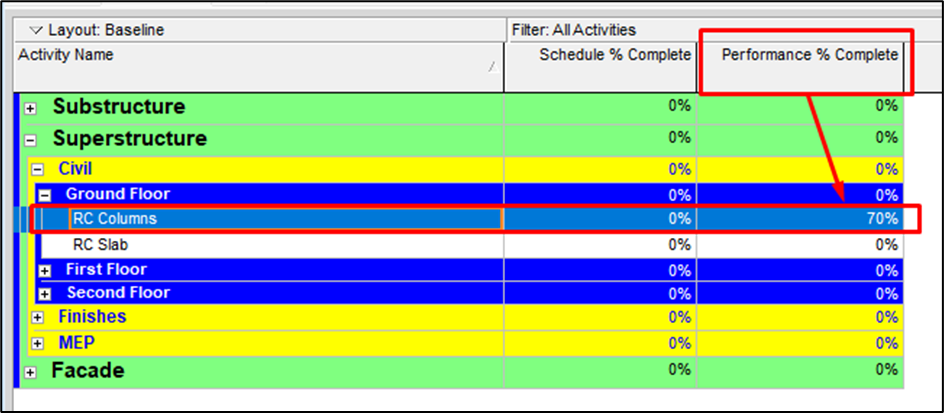
- Finally, after running the schedule, the overall progress appears under Performance % Complete. In this case, 70% reflects 100% completion of steel fixing (50% of the activity) plus 80% completion of shuttering (20% of the activity).
Source: https://planningengineer.net/comprehensive-guide-to-using-activity-steps-in-primavera-p6/
What are The Advantages of Activity Steps in Primavera P6?
Incorporating activity steps is a key skill covered in Primavera P6 training, which helps project managers optimize schedules and enhance project outcomes. Moreover, activity steps in Primavera P6 offer several practical advantages, which are as follows:
- More Accurate Progress Tracking: Steps allow you to measure progress based on completed work rather than rough percentage estimates.
- Improved Visibility of Work Breakdown: Each activity is broken into logical, manageable steps, making it easier to understand what’s happening on site.
- Better Schedule Control: You can monitor delays or bottlenecks at the step level and take corrective action earlier.
- Clearer Communication With Stakeholders: Steps provide a transparent view of what is done and what remains, improving reporting and coordination.
- Reduced Subjectivity in % Complete: Using physical % complete tied to steps minimizes guesswork and increases schedule reliability.
- Enhanced Performance Analysis: Step-level progress supports more realistic updates, forecasts, and earned value analysis.
Conclusion
Using activity steps in Primavera P6 transforms how project progress is tracked and managed. By breaking down activities into measurable components, project managers gain precise control over schedules, resources, and performance.
In this blog, we’ve discussed how to set up and use activity steps in Primavera P6. We also explored the key advantages of activity steps in Primavera P6such as more accurate progress tracking, improved visibility of work breakdown, better schedule control, and enhanced performance analysis.
By following this guide, you can apply activity steps effectively in your projects, leading to more reliable scheduling, easier progress reporting, and better decision-making.