

Building a reliable Primavera P6 construction schedule isn’t just about organizing tasks. It’s about creating a roadmap that drives project success from start to finish. In today’s construction industry, even minor delays or missteps can impact deadlines, budgets, and client trust. That’s why mastering the art of scheduling in P6 is essential for every project manager and planner.
In this guide, we’ll walk you through the 7 best practices for Primavera P6 scheduling that help you stay ahead of challenges and keep your team aligned.
Watch Video Instead
Watch our video to learn the 4 project schedule levels to master project management.
What are the Components of a Primavera P6 Scheduling?
A well-structured P6 project schedule is built on several key components. Understanding these elements is essential to creating schedules that deliver projects on time and within scope.
1. Activities
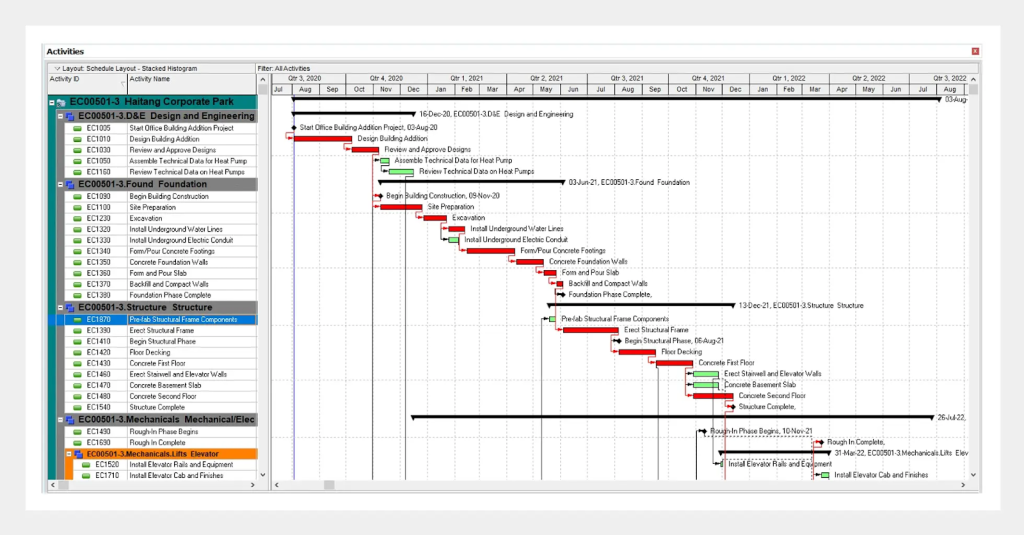
Each activity defines a specific task with a set start date, finish date, and duration. For instance, in construction, activities may include excavation, foundation, and framing; while in software development, they could involve coding, testing, and deployment.
2. Milestones
Milestones mark critical checkpoints or achievements within a project. They serve as indicators of progress and are valuable for tracking performance and reporting to stakeholders.
3. Dependencies
Dependencies define how activities relate to one another. Some tasks can’t begin until others are finished. P6 supports dependency types, including Finish-to-Start, Start-to-Start, Finish-to-Finish, and Start-to-Finish.
4. Resources
Resources refer to the people, equipment, and materials needed to complete project tasks. With P6, managers can efficiently assign and monitor resources, helping to prevent overallocation and ensure the optimal use of project assets.
5. Calendars

Source: https://www.linkedin.com/pulse/go-to-guide-building-cringe-worthy-primavera-p6-lepage-primavera-p6/
Calendars specify working and non-working periods for both activities and resources. They help maintain realistic schedules by accounting for weekends, holidays, and shift patterns.
6. Constraints
Constraints are rules or limitations that affect how and when activities can be scheduled. They might include fixed start or finish dates, resource limits, or regulatory requirements.
7 Ways to Build an Effective Primavera P6 Scheduling
Source: https://opteam.ai/p6-construction-scheduling/
Below are seven best practices to help you develop a reliable, efficient, and data-driven construction schedule:
1. Define a Clear Work Breakdown Structure (WBS)
Start by organizing your project into a well-defined Work Breakdown Structure (WBS). This hierarchy breaks the project into manageable sections, helping planners categorize activities logically.
2. Establish Realistic Activity Durations
Avoid the temptation to compress timelines. Base each activity’s duration on realistic estimates derived from past data, resource availability, and productivity rates. Overly optimistic durations can lead to schedule overruns and resource conflicts.
3. Link Activities with Logical Relationships
Every activity in P6 should have a logical predecessor and successor (except the first and last). Use Finish-to-Start (FS) relationships wherever possible and limit Start-to-Start (SS) or Finish-to-Finish (FF) dependencies. This creates a clearer and more manageable critical path.
4. Assign Resources and Costs Early
Assigning resources (labor, equipment, materials) early in the process ensures accurate forecasting and cost control. By integrating resource and cost data, you can detect potential bottlenecks and make informed decisions to keep the project within budget.
5. Regularly Update and Review the Schedule
A construction schedule is a living document. Update it regularly to reflect on-site progress, any delays, or changes to the scope. Moreover, frequent updates help maintain schedule accuracy, improve forecasting, and enhance communication among project teams.
6. Perform Critical Path Analysis
The critical path represents the sequence of activities that directly impact the project’s completion date. Regular critical path reviews help identify tasks that require immediate attention, enabling proactive mitigation of potential delays.
7. Validate Schedule Quality with Checks and Reports
Before finalizing the schedule, perform quality checks using P6’s built-in reports or third-party validation tools. Also, review open ends, excessive constraints, and unrealistic float values.
Want to Learn More About Scheduling!
Watch our detailed video on mastering airport construction scheduling.
Conclusion
Mastering Primavera P6 scheduling techniques will help you enhance coordination, minimize delays, and ensure every milestone contributes to your project’s timely completion and overall efficiency.
In this guide, we discussed the key components of a Primavera P6 schedule, which form the backbone of effective planning. We also explored the 7 best practices for performing critical path analysis and validating schedule quality.
By applying these strategies, you can create schedules that are not only accurate but also adaptable to real-world challenges.